Sales & purchases
All ten voucher types: list, open, create, edit, convert, cancel and share.
KVN Billing for Android
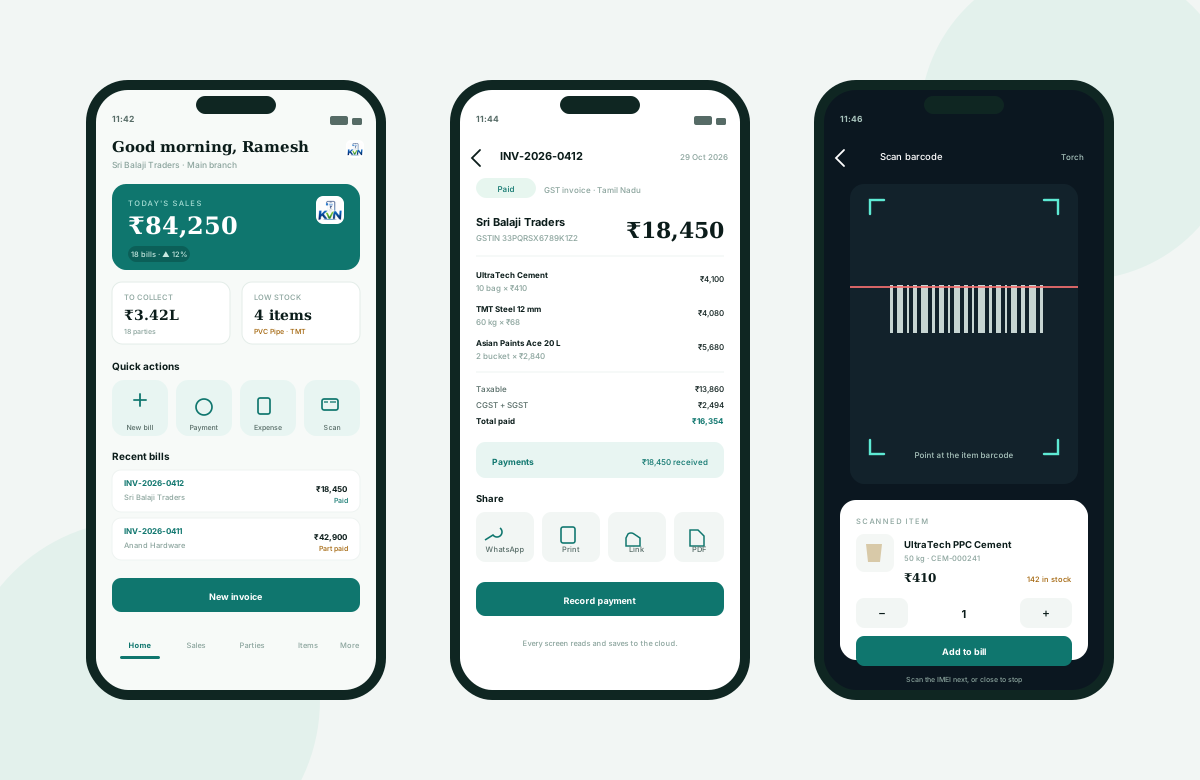
Raise a bill at the counter, check stock in the godown and record a payment on the way back — all written to the same cloud books as the web app.
 KVN Billing · Android
On the phone
The app covers the counter and the godown. Reports, GST files and settings stay on the web app, opened inside the same signed-in session.
All ten voucher types: list, open, create, edit, convert, cancel and share.
Add a customer, open their ledger, send the statement link on WhatsApp.
Check stock before promising an item, add a new product with HSN and GST.
Record money in and out, attach a photo of the bill, settle the right invoices.
Use the camera to scan an item code, then each IMEI; scanning stops at the expected quantity.
Android print screen for A4 or a slip, Save as PDF, or a WhatsApp link.
Invoice numbers are handed out by the server — not stored on the phone — so two counters never take the same number. Stock, ledger and GST move together.
Signing in on a new phone ends the session on the old one. Repeated wrong passwords lock the login; repeated lockouts need the platform administrator to unlock it.
Before you install
The app is distributed by us today; ask for the current install link. A Play Store listing is prepared but not live yet.
Ask for the install link →Android 7.0 and above. The app targets current Android versions while still installing on older shop phones.
The cloud app needs a connection. When the phone is offline it shows a clear bar and does not pretend a bill was saved.
Yes. Print through Android's print screen, including Save as PDF, or share the invoice link on WhatsApp.
Yes, but one session per login is active: signing in on the phone ends the browser session. Use a separate staff login for a second counter.
Create your business and raise the first invoice. Ask us for the Android app when you are ready for the counter.